
Springwood Infant and Juniors School Federation
E-Safety
How to balance screen time workshop
Below is the link to the workshop on how to reduce your child's screen time. It is full of useful advice, statistics and ideas about how to do this successfully.
How to balance screen time workshop
Our E-safety Quiz to Parents 2026
Thank you to all of the parents and carers that took the time to complete our E-safety Quiz, this has helped us shape support to parents, design our E-safety day and look ahead to workshops.
What have we learnt from our 71 answers?
-76% of children currently use a tablet at home, making it the most popular device for digital access.
- 68% of children are regularly using YouTube, by far the most utilised app among students.
- Almost half of the children (46.5%) are actively playing Roblox and Minecraft, which are the two most popular online games in our school community.
- 69% of children access the internet via a Smart TV or streaming service, highlighting the importance of setting parental controls on the "big screen" as well as mobile devices.
- The majority of children (51%) spend between 1 to 2 hours on a device per day.
- While 35% of parents restrict device use to specific rooms under direct supervision, 41% of children are permitted to use their devices anywhere in the home.
- Parents rated their confidence in supporting their child in the digital world at an average of 7.5 out of 10, showing a strong foundation but also a clear desire for further guidance.
Parental controls/ Screen time
Below are a number of guides to monitor screen time and set parent controls for the devices most commonly used in our school:
iPads/ iPhones
Screen time - Set up Screen Time for a family member on iPad – Apple Support (UK)
Parental controls - Use parental controls to manage your child's iPhone or iPad - Apple Support
Amazon fire tablets
Screen time and parent controls - How to Limit Screen Time on an Amazon Fire Tablet - Tech Advisor
Nintendo Switch
Parental Controls - How to Set Up, Adjust, or Remove Parental Controls on Nintendo Switch | Support | Nintendo UK
Screen time - How to Set Play-Time Limits | Information from Nintendo to Parents and Guardians | Nintendo
Android phones/ tablets
Parental controls - Set up parental controls on an Android device - Android Help
Screen time - Manage how you spend time on your Android phone with Digital Wellbeing - Android Help
We will be holding some 'Device lab' Workshops soon where parents can bring in their children's devices to help with adding these settings. Watch this space!

The "Accidental Exposure" (My child saw something scary/inappropriate)
The Problem: Your child was watching YouTube or playing Roblox and stumbled across a video or "room" with scary characters, bad language, or adult themes.
-
The Treatment:
-
Stay Calm: Don't take the device away immediately; this might stop them from telling you next time.
-
Talk it through: Ask, "How did that make you feel?" and explain that some things on the internet are meant for adults, not children.
-
The Technical Fix: Show them how to 'Flag' or 'Report' the content. This empowers them to take action. Then, double-check that "Restricted Mode" is enabled on the app.
The "Unknown Contact" (A stranger sent a message)
The Problem: A "friend request" or message pops up in a game like Roblox or Minecraft from someone the child doesn't know in real life.
-
The Treatment:
-
Reinforce the Rule: Remind them that "Online Friends" are different from "Real Life Friends."
-
The Technical Fix: Go into the game settings together and set Communication to "Friends Only" or "Off."
-
Action: Block the user immediately. Explain that blocking isn't being "mean"; it’s being safe.
The "In-App Purchase" Mistake (My child spent money without asking)
-
The Problem: You receive an email receipt for "Robux" or "V-Bucks" that you didn't authorise.
-
The Treatment:
-
The Discussion: Explain that digital money is real money.
-
The Technical Fix: On iPhones/iPads, enable "Ask to Buy." On Google/Android, require a Password for all purchases.
-
Recovery: Most App Stores (Apple/Google) offer a one-time refund for "accidental" purchases by a child if you contact their support chat within 48 hours.
The "Screen-Time Tantrum" (My child won't put the device down)
-
The Problem: Asking your child to stop playing leads to an argument or a "meltdown."
-
The Treatment:
-
The Social Fix: Use the "5-Minute Warning" or a physical kitchen timer so the transition isn't a shock.
-
The Technical Fix: Use Apple Screen Time or Google Family Link to set a hard "Down Time" (e.g., 7:00 PM). The device simply turns off, so the "bad guy" is the software, not the parent.
The "Privacy Leak" (My child shared personal info)
-
The Problem: You notice your child has used their real full name, school name, or shared a photo of themselves in a school uniform online.
-
The Treatment:
-
The Discussion: Use the "Billboard Test"—ask them, "Would you be happy for this photo to be on a giant billboard in the middle of town?"
-
Action: Change the username to something anonymous (e.g., "BlueDragon123").
-
The Technical Fix: Audit the privacy settings on the device and turn off Location Services for the camera and social apps.
Building trust
Trusting your children to be online is a great idea as it prepares them for the digital world. However, we understand that the internet is huge and comes with many problems that cannot be understood by adults let alone children.
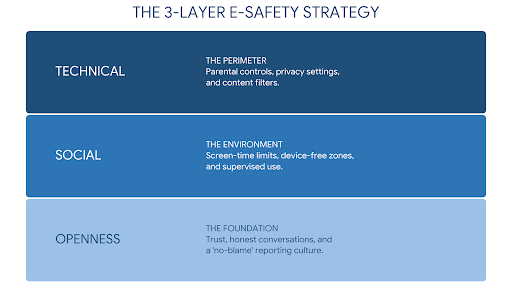
Therefore, when your child has a device use the 3 Layer-safety rule:
1. Technical - Parent controls (The fence)
2. Social – Only friending people your child knows. Having boundaries where devices can be used and at what times (The Gate)
3. Openness – The "Nothing is too weird to tell me" rule (Open door)
 Policing the use of phones/tablets
Children need to learn from their mistakes and review how much time they have been spending on their devices.
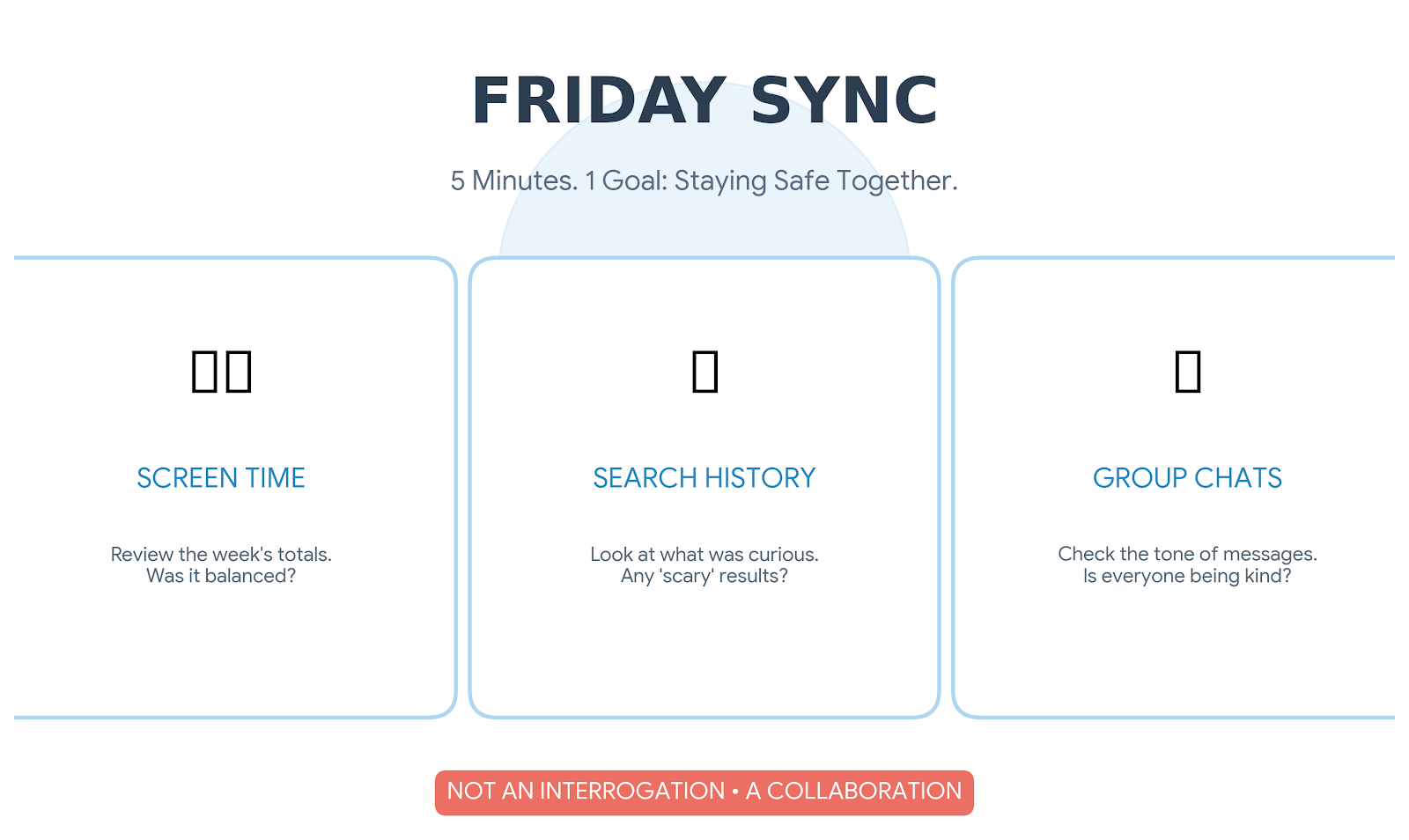
"Friday Sync" is an idea where parents and children sit down together and spend 5 minutes looking at screen time, reviewing history of searches and checking group chats.
This is not an interrogation, but is a collaborative review and checking that everyone is safe.
Safer Internet Day 2026 is here!
Safer Internet Day 2026 will take place on the 10th of February 2026, with celebrations and learning based around the theme ‘Smart tech, safe choices – Exploring the safe and responsible use of AI’.
Everyone’s talking about AI, and with many children and young people hearing about and using AI online, it’s important they have the skills and confidence to make safe choices when they are using smart technology.
This Safer Internet Day we are exploring the impact of AI on all of our lives, looking at how AI can be used for good, and giving advice and guidance that empowers people to use AI safely and responsibly.
For parents and carers
AI technology is increasingly part of all our lives, so this Safer Internet Day we are starting a conversation about how to use it safely and responsibly. Use these top tips to help keep you and your loved ones safe online.
Enjoy going online together and talk regularly about your family’s online lives
The internet is amazing and can help us all to access information and entertainment. Spend time online with your child to understand how they are using technology and talk together about the good and the bad parts of being online. Talk about your own experiences and find other opportunities to get the conversation started, like stories in the news. Make sure your child knows they can talk to you about anything that they see or experience online.
Understand where AI technology is being used and the impact it can have
From summaries on search engines, to voice assistants and photo editing tools, AI powered features are being added to many of the apps and devices we use day-to-day. Look out for information and warnings notifying you where AI technology is in use or where content has been created using AI. Help your child to recognise these too. Remember, AI can make some tasks simpler but may also collect data about you and your family, or share unreliable information, so consider how to use it safely and responsibly.
Recognise what safe and responsible use of technology looks like
To use technology, including AI, safely and responsibly, it’s important to reflect on the potential impact it can have on yourself and others. How does your use of technology make you feel? How can you use technology with kindness and respect for others? Does your use of technology benefit you or help you build skills? How might it affect you now, and in the future? Ask these questions of your own internet use, as well as your family’s.
Stay informed with free resources
Young people have told us about the incredible ways they’re using AI, but also about their worries for what it means for the future. Issues such as the environmental impact of AI, what it means for job prospects, and the threat of deepfakes can seem scary but remember, you don’t need to have all the answers. Stay informed using free resources like those produced for Safer Internet Day and talk to your child about their concerns about new technology – you can always work together to find more information.
Know where to go for help if something goes wrong
Like any technology, using AI comes with risks. Some AI tools, like ChatGPT, have built-in reporting features where you can raise issues such as inappropriate or harmful content. Many social media platforms also allow you to report content you suspect has been created with AI. Additionally, AI generated content can break the law. If you see illegal images that show child sexual abuse (including AI generated images), you should report these to the IWF and on the platform where they are being shared. If someone creates an image of you or your child using AI these can also be reported on the platform where they are being shared, and AI generated nude images can be reported to Stop NCII (for images of adults) and Report Remove or Take It Down (for images of under 18s).
Top Tips for 7-11 year old children
Understand what AI is and how it can be used
Artificial intelligence technology is used by lots of people every day. AI suggests videos on streaming apps like Disney+ and Netflix, gives directions on map apps, can help translate different languages and can even create music and poems. Talk to your friends and family to see what they know about AI and where they have used it.
Consider how using AI can impact you and other people
Like a lot of other technology, AI can save us time and energy. You could use it to find the answer to a question, to check your spelling, or to create images or videos. Whilst AI can be a great tool, it’s important that we think about when and how we are using AI, and don’t use it in place of our own thinking and creativity, or to do things that may upset or worry other people.
Remember that AI is technology and isn’t perfect
Even though it might seem like it knows everything, AI can still get things wrong. If you are using AI to get information or help with something, it is important to think carefully about what it tells you and remember that it should never replace support from people you know and trust. If you are ever unsure about something AI has told you, check with other sources, this could include looking on websites you trust or talking to an adult.
Look out for signs that something might be AI generated
It can feel hard to tell if something has been created using AI or not. Some websites and apps will tell you that AI was used, but this doesn’t always happen. There are some signs you can look out for including if it looks surprising or shocking, if it looks too perfect, or if there are details you know aren’t true. If you see something you are not sure is created using AI or not, speak to an adult about the signs they look for and try to work it out together.
Know where to get help
Although we know that AI can be used in a lot of great ways, remember there is always someone who can help if you are worried about something that has been created by AI or if you have concerns about the way you or someone you know is using AI. You can speak to trusted adults like your parents, grandparents, teachers, or club leaders about any concerns you have online.
Issue online that you need support with?
The links below give specific advice on supporting your child with issues that they may have online.
Welcome to our Internet Safety site for parents. Please also check our 'Keeping Children Safe in Education' page for updates on E-Safety Advice.